Start From Scratch: The Local Setup
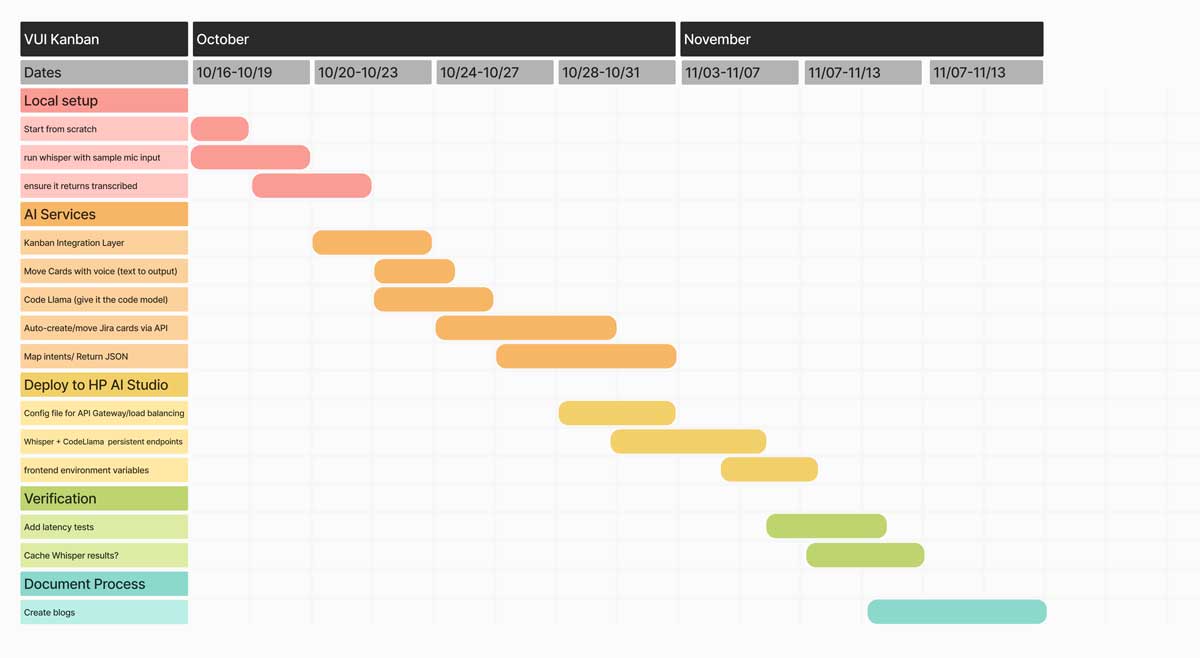
October 16-18: Day one of development. Setting up HP AI Studio environment, installing dependencies, getting Whisper running. The 8-cell template methodology begins.
The Shared Folder Problem
Professor Bartlett's warning: "If we all open those notepads at the same time in the shared folder, we're gonna be live editing together. I don't even know what will happen. I honestly don't know how the system will handle 10 different people all simultaneously trying to run, execute kernels, restart kernels. Who knows?"
The solution: copy everything to local storage.
HP AI Studio has two folder types: shared (owned by the professor, disappears when he logs out) and local (your machine's storage, persistent). The first step of any project: copy template files from shared to local.
The BERT Week 3 Template
We started with Professor's BERT template. Not because BERT is smart, "I promise you this BERT is done. This is not a smart BERT", but because it demonstrates the workflow.
The process:
- Log into HP AI Studio
- Navigate to Projects → BERT Week 3
- Copy template files from shared to local folder
- Open "run_workflow" notebook (the legible template)
- Hit play on the Nemo Framework workspace
- Watch it download dependencies
The 8-Cell Methodology
Professor Bartlett's structure: break complex processes into discrete cells. Each cell has one job. If something breaks, you know exactly which piece failed.
Cell 1-4: Execution & Configuration
Cell 1: Start execution
Cell 2-4: Configure GPU settings, verify CUDA drivers
Cell 5-7: Install & Import
Cell 5-6: Install required Python packages (PyTorch, transformers, Whisper)
Cell 7: Import libraries into notebook
Cell 8-10: Data Loading
Cell 8: Verify assets exist
Cell 9: Preprocess data
Cell 10: Load from pandas dataset
This structure isn't arbitrary. It's defensive programming. Each cell validates before the next one runs.
Understanding Cell Execution
HP AI Studio notebooks show execution state with numbers and asterisks:
- Number (1, 2, 3...): Cell completed execution in that order
- Asterisk (*): Cell is waiting to execute or currently running
- Empty: Cell hasn't run yet
When you restart the notebook, all numbers disappear. Then cells execute sequentially, each asterisk becoming a number once complete.
The Localization Constraint
HP AI Studio machines are powerful: 64GB RAM, NVIDIA GPUs, capable of running Large V3 locally. But there's a tradeoff: everything is localized to these machines.
Professor's advice:
"Look at your schedule through the week and make time to come in here so that you can work. You can only do that if you're in this space. Really start focusing on that."
Voice Kanban development required physical presence. No remote work. No cloud alternatives. The GPUs were here, so I had to be here.
Installing Whisper Dependencies
The actual installation process for Whisper Large V3:
!pip install torch torchvision torchaudio --index-url https://download.pytorch.org/whl/cu118
# Cell 6: Install Whisper and audio libraries
!pip install openai-whisper
!pip install sounddevice soundfile
# Cell 7: Import libraries
import torch
import whisper
import sounddevice as sd
import soundfile as sf
PyTorch installation took 10+ minutes. Whisper download: another 5-7 minutes for the Large V3 model (1.5GB). Audio libraries: quick, under a minute.
The Requirements.txt Cheat Code
Professor showed us a shortcut: requirements.txt files. Instead of manually installing each package, create a text file listing everything:
openai-whisper==20231117
sounddevice==0.4.6
soundfile==0.12.1
gradio==4.4.1
transformers==4.35.0
Then run one command:
Python reads the file and installs everything automatically. "It's like a cheat code to make it download stuff in the background."
Configuring the GPU
HP AI Studio machines recognize CUDA automatically. But templates built from scratch need explicit GPU configuration:
import torch
print(f"CUDA available: {torch.cuda.is_available()}")
print(f"CUDA device: {torch.cuda.get_device_name(0)}")
# Set device
device = "cuda" if torch.cuda.is_available() else "cpu"
model = whisper.load_model("large-v3").to(device)
This code checks if NVIDIA GPUs are available, identifies which one, and loads the Whisper model directly onto GPU memory for faster inference.
The Login Ritual
Every session started the same way:
- Sign out of everything from previous user
- Hard shutdown the machine
- Power on, log in with your credentials
- Open HP AI Studio
- Navigate to your project
- Verify local files still exist (they should)
- Launch workspace
The ritual mattered. HP AI Studio's complex login tied to personal accounts. If you forgot to sign out, the next person couldn't access their work.
Breaking Down Complexity
Professor's repeated advice:
"We work fast and iteratively. We fail quickly, so we can deduce how to get to that functional solution. Don't be afraid to mix and match skills. Take a cell, put it into Claude, ask where to insert the system prompt. Test one block at a time."
Voice Kanban wasn't one monolithic codebase. It was dozens of discrete cells, each testable independently. GPU config works? Green light. Whisper loads? Green light. Audio capture works? Green light.
Incremental validation. No 1000-line code dumps. One piece at a time.
What Actually Got Built
By October 18, the local setup included:
- Environment: HP AI Studio with GPU access configured
- Dependencies: PyTorch, Whisper, audio libraries installed
- Model: Whisper Large V3 downloaded and loaded on GPU
- Workflow: 8-cell template structure established
- Testing: Sample audio transcription working
No Kanban integration yet. No GitHub API. No task routing algorithms. But the foundation was solid.
The Week Six Reality Check
Professor's red flag alarm: "We're in week six. I decided to look on your blogs and right now is the time. Right now. This is the moment where you need to start actually tracking and cataloging your work."
The expectation: screenshot everything. Reflect on every attempt. Document successes and failures. Practice-based research through creation, not just reading.
Ideate → Create → Reflect. Think of the idea. Attempt to make it. Reflect on what worked. Repeat in quick succession.
Why This Mattered
October 16-18 wasn't about building the full system. It was about establishing foundations that wouldn't need rebuilding.
GPU configuration: done once, never touched again. Dependencies: installed once, version-pinned, stable. 8-cell structure: established once, extended infinitely.
The local setup phase taught defensive development: test each piece before integrating. Validate before advancing. Document as you build.
Voice Kanban wouldn't succeed because of brilliant algorithms or novel AI techniques. It would succeed because the foundation was methodically built, one cell at a time.