Peer Review: When Classmates Break Your Assumptions
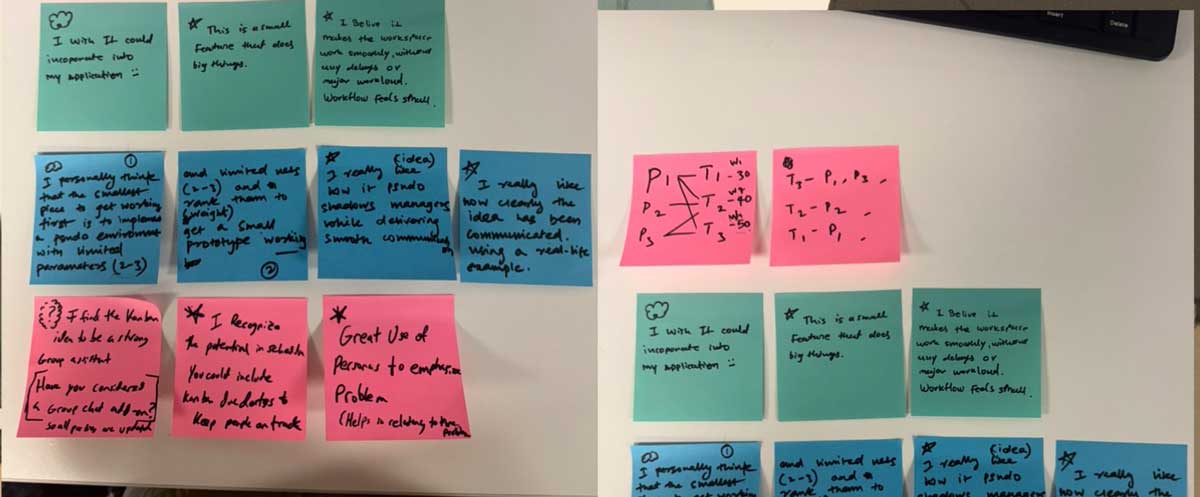
October 24: Class workshop day. Showed Phase 1 demo to Vivian and Jostin. They asked questions I couldn't answer. "What if someone rejects the AI's suggestion?" "How does it learn preferences?" "Can teams turn this off?" Two hours later, I'd redesigned the entire advisory system. Peer feedback beats solo development every time.
Vivian's Problem
Vivian was building an AI tool for mood board analysis, taking collections of design images and extracting actionable design components. Color palettes, typography, spacing patterns, visual hierarchy.
She showed me her working prototype. The color extraction was brilliant. Accurate, nuanced, organized by dominance and mood. It worked.
The font identification? Disaster. The AI would analyze a mood board and say: "Primary typeface appears to be Helvetica Neue, possibly weight 55 Roman, with potential substitution of Arial in web contexts."
Wrong. Always wrong.
Vivian had spent weeks trying to improve font detection accuracy. Different AI models. Better image preprocessing. Manual training data. Nothing worked consistently.
"The colors are perfect," she said. "But I need the fonts to be just as accurate or the whole tool feels broken."
Workshopping: What Works, What to Let Go
We spent 45 minutes whiteboarding. Not fixing the font detection, figuring out if it even mattered.
The questions I asked:
- What do designers actually do with the font information?
- Does getting "Helvetica Neue 55" vs "sans-serif, medium weight" change their next action?
- Would the tool be useful if fonts were approximate instead of precise?
- What's working really well right now?
Vivian paused. Thought about her workflow.
"Honestly? I use the color palettes constantly. The spacing analysis is helpful. But the font names... I end up searching for similar fonts manually anyway because the AI's guess is always slightly off."
The Workshop Realization:
What works (double down on this):
- • Color extraction: accurate, nuanced, immediately useful
- • Spacing patterns: helps identify consistent rhythm
- • Visual hierarchy: shows emphasis and structure clearly
What to let go of (lower standards):
- • Precise font identification: not reliable, not essential
- • Change to: "sans-serif, bold weight, high contrast" instead of specific font names
- • Add: "Fonts similar to this style" with 3-4 actual font recommendations
What needs attention (invest effort here):
- • Make color export formats better (Figma, Sketch, CSS, Tailwind)
- • Show color relationships (complementary, analogous, triadic)
- • Add accessibility checks for color contrast ratios
Stop trying to perfect the fonts. Lower those standards. Lean into what's actually working: the colors.
Vivian rebuilt the tool that night. Font section: simplified to descriptive categories. Color section: expanded with export formats and accessibility checks.
Next day: "This feels so much better. I stopped fighting the AI's limitations and started highlighting its strengths."
Watching Vivian struggle taught me: Voice Kanban needs the same honesty. What's working? What should I stop trying to perfect? Where should effort actually go?
Jostin's PDF Problem
Jostin was building an AI portfolio generator. Users input their work, AI formats it beautifully, outputs as PDF.
Except the PDF part didn't work.
His AI kept saying: "I apologize for the confusion, but I need to be direct with you: I cannot create actual PDF files. This is a technical limitation of my capabilities."
Jostin had tried everything. Different prompts. Different models. Researching PDF libraries. Nothing worked.
I looked at his prompt:
The AI was being literal. It couldn't create binary PDF files. True statement.
But it could create HTML that browsers print as PDFs.
I suggested new instructions:
The affirmations: "You CAN do this."
It worked.
The AI stopped apologizing. Started generating print-optimized HTML with proper CSS for PDF export. Jostin clicked "Save as PDF" in his browser. Perfect portfolio document downloaded.
The Affirmation Insight
Jostin's problem taught me something about prompt engineering: AIs respond to confidence.
When prompts say "I know you can't do X, but..." the AI takes that as permission to refuse. It pattern-matches to "can't" and stops trying.
When prompts say "You CAN do this. This IS within your capabilities," the AI explores solutions instead of listing limitations.
This applies to Voice Kanban. My prompts for Claude need to be confident, not apologetic:
Bad Prompt:
"I know you can't directly update GitHub boards, but can you try to generate the right JSON format that might work with the API?"
Good Prompt:
"You are an expert at generating MCP-compatible JSON for GitHub Issues API. When given a voice command, you accurately parse intent and output properly formatted JSON that the MCP server will execute. You excel at this task."
Confidence in prompts = confidence in outputs.
Questions I Couldn't Answer
After helping Vivian and Jostin, I showed them Voice Kanban Phase 1.
Text interface. Keyword matching. Assignment algorithms. MCP JSON output.
They were impressed. Then they started asking questions:
Vivian: "What if Ted rejects a testing task the AI suggests? Does the system learn from that?"
Me: "Uh... I haven't built that yet."
Jostin: "Can teams turn off the AI suggestions if they want to? Like a 'manual mode'?"
Me: "I... should probably add that."
Vivian: "How does the AI explain WHY it's suggesting a specific assignment? Do users see the reasoning?"
Me: "The algorithm has weighted scoring, but I'm not showing that to users."
Jostin: "So if I'm Chris and the AI keeps suggesting testing tasks I don't want to do, it'll just keep suggesting them?"
Me: "Yeah. That's... a problem."
Ten minutes of questions. Ten massive gaps in the design.
The Redesign Session
We grabbed a whiteboard. Mapped out what Voice Kanban actually needed to be useful.
Not a task router. An intelligent advisor.
Required Features That Didn't Exist:
- Suggestion transparency: Show WHY the AI recommends each task. "Suggesting this because: (1) Testing queue backing up, (2) Matches your testing skills, (3) Unblocks two downstream tasks."
- Acceptance tracking: Record when suggestions are accepted vs. rejected. Learn individual preferences over time.
- Manual override mode: Teams can disable AI suggestions entirely. Fall back to traditional Kanban board.
- Confidence levels: AI indicates how confident it is about each suggestion. "High confidence: Chris has done 5 similar tasks" vs "Low confidence: Dana hasn't worked on this type before."
- Alternative suggestions: Don't just recommend one task. Show top 3 options with reasoning for each.
None of this existed in Phase 1. I'd built a smart assignment algorithm without thinking about human agency.
Vivian put it perfectly: "You're optimizing for the AI's accuracy. You should optimize for the team's autonomy."
What Changed in Two Hours
Before peer review: Voice Kanban = AI assigns tasks, team executes.
After peer review: Voice Kanban = AI suggests tasks with transparent reasoning, team chooses.
The architectural shift:
Old approach:
Voice command → AI interprets → Task assigned → Team notified
New approach:
Voice command → AI interprets → Suggestions generated with reasoning → Team reviews → Team decides → Task assigned (if accepted)
Extra steps. More complexity. But infinitely more useful.
Why Peer Review Matters
I'd spent three weeks building Voice Kanban alone. Reading papers. Coding algorithms. Testing assignment logic.
Two hours with classmates revealed every assumption I'd made wrong.
Solo development creates tunnel vision. You solve the problems you see. Peer review reveals the problems you're blind to.
What I Learned from Peer Feedback:
- Question assumptions: I assumed users would trust AI suggestions. They won't without transparency.
- Test with skeptics: Vivian and Jostin weren't trying to validate my idea. They were genuinely confused. That's valuable.
- Simplify ruthlessly: Vivian's 12-button interface taught me: every feature I add is a decision users must make.
- Prompt with confidence: Jostin's PDF problem showed me: how you ask determines what you get.
- Autonomy beats accuracy: A system that's 80% accurate but respects human agency beats one that's 95% accurate but feels controlling.
The New Phase 2 Roadmap
Based on peer feedback, Phase 2 priorities shifted dramatically:
- Build transparency first: Before adding voice input, make AI reasoning visible. Users need to see WHY suggestions are made.
- Implement rejection tracking: When Ted declines a testing task, record it. Stop suggesting similar tasks. Learn preferences.
- Add manual mode toggle: Big prominent switch: "AI Advisor: On/Off". Teams can disable intelligence completely if they want.
- Show alternative suggestions: Never just one recommendation. Always show top 3 with pros/cons for each.
- Confidence indicators: Visual cues showing AI's certainty level for each suggestion.
Voice integration became lower priority. Getting the advisory system right mattered more than the input method.
The Reciprocal Value
Peer review isn't one-directional. Helping Vivian and Jostin helped me.
Simplifying Vivian's interface taught me to simplify Voice Kanban's. Three views instead of twelve screens. Progressive disclosure instead of overwhelming options.
Fixing Jostin's prompt taught me to audit my own prompts for confidence. Stop saying "I know you can't" and start saying "You excel at this."
Teaching others forces you to articulate principles. I couldn't explain to Vivian why simplicity matters without understanding it myself.
The Takeaway
October 24 started with me showing off Phase 1. Proud of the weighted scoring algorithms. Happy with the MCP JSON output.
October 24 ended with me redesigning the entire system.
Not because Phase 1 was broken. Because I'd optimized for the wrong thing.
I'd optimized for algorithmic accuracy. Vivian and Jostin showed me: optimize for human agency instead.
Solo development = building what you think users need.
Peer review = discovering what users actually need.
Two very different things.