GitHub Issues as Kanban: The MCP Breakthrough
October 22, 11:47 PM. Tried to clone the GitHub MCP repository. npm errors everywhere. Python version conflicts. Authentication failures. Then it clicked: I was solving the wrong problem. MCP servers aren't something you install, they're hosted endpoints you connect to.
The Installation Trap
After two days of failed GitLab and Trello attempts, I found a GitHub repository called sunwood-ai-labs/github-kanban-mcp-server.
Perfect. Exactly what I needed.
Cloned it. Ran the installation commands:
$ cd github-kanban-mcp-server
$ npm install
Errors. Dependency conflicts.
npm ERR! Could not resolve dependency
Tried installing the missing SDK manually. Version conflicts with Python. Tried Python 3.9. Then 3.10. Then 3.11.
Two hours later: still no working MCP server.
The Text Message
October 21, 5:26 PM. My friend who works in developer tools responded to my question about Trello MCP servers:
"I use GitHub and love its API. There is also this MCP server for GitHub's Kanban:"
[Link to sunwood-ai-labs/github-kanban-mcp-server]
"But that one you have to run yourself so maybe not a great choice."
"This is better. Issues are the name of the 'cards' on GitHub's Kanban board."
[Link to github/github-mcp-server]
"That's run by GitHub. AI Studio, code LLama, etc. should be able to use remotely with no need for you to install and run it."
Wait.
Remotely.
No need to install and run it.
Understanding MCP Architecture
I'd been thinking about MCP servers wrong. I thought they worked like this:
What I Thought (Wrong):
- Clone MCP server repository
- Install dependencies (Node.js, Python, etc.)
- Run the server locally on your machine
- Configure port forwarding
- Point your AI application to localhost:3000
But GitHub's MCP server works like this:
How It Actually Works:
- GitHub hosts the MCP server at
api.githubcopilot.com - You configure your AI application with that URL
- You provide authentication (GitHub personal access token)
- The AI sends requests to the hosted endpoint
- GitHub's server handles all the API translation
No installation. No local server. No npm dependencies. Just a URL and a token.
Why This Changes Everything
Hosted MCP endpoints solve the fundamental problem I'd been hitting with GitLab and Trello: deployment complexity.
Voice Kanban's architecture needs to work in:
- HP AI Studio (class requirement)
- Student laptops (inconsistent environments)
- Jupyter notebooks (no persistent server processes)
- Demonstration mode (5-minute setup, not 2-hour troubleshooting)
Hosted endpoints eliminate all of these constraints. Point to a URL, provide a token, done.
Learning GitHub Projects
With the MCP architecture suddenly clear, I needed to understand how GitHub's Kanban system actually worked.
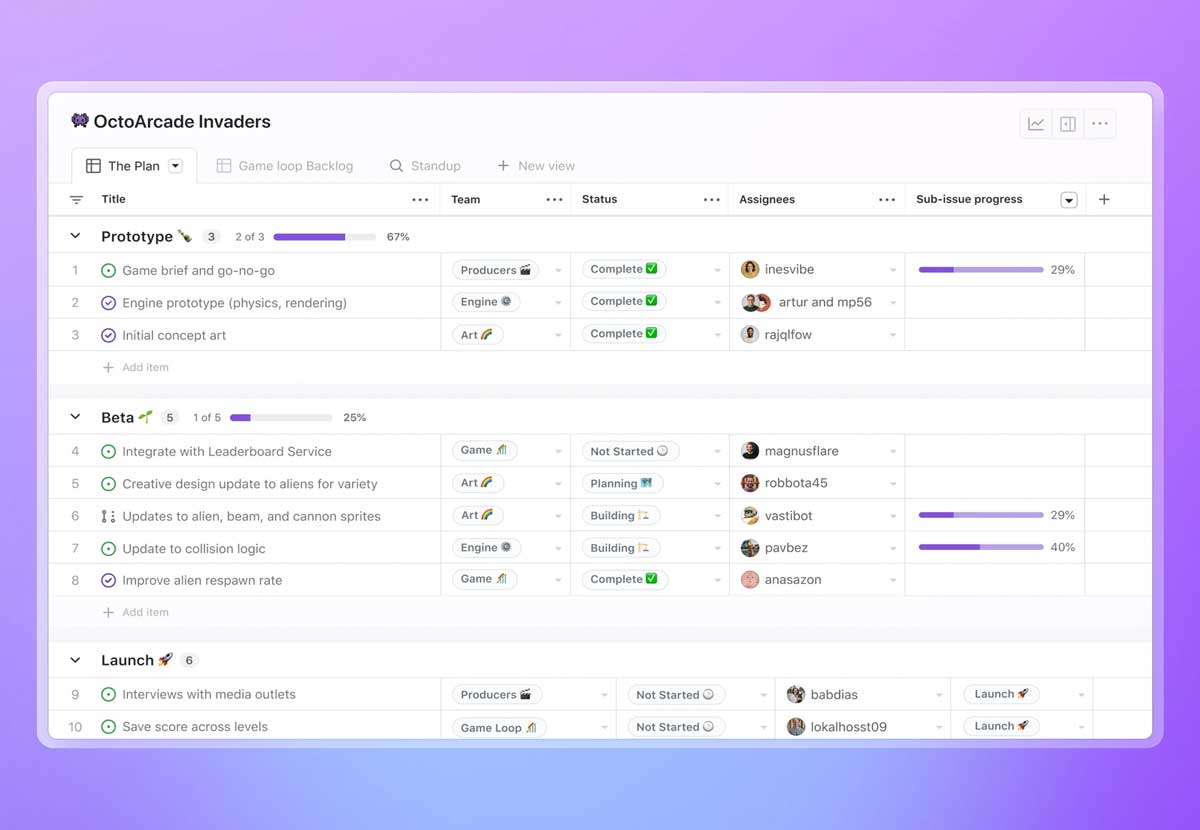
GitHub doesn't call them "Kanban boards." They call them Projects, specifically, Projects (beta), which is their modern project management system.
The structure:
GitHub Projects Terminology
- Issues = Kanban cards
Individual work items with title, description, assignees - Labels = Task categories
bug, feature, documentation, etc. - Status = Column position
Todo, In Progress, Done (customizable) - Assignees = Who owns the work
Can assign multiple people per issue - Milestones = Sprint groupings
Time-boxed collections of issues
The API Exploration
I created a test repository: voice-kanban-test-project.
Created my first issue manually:
- Title: "Set up authentication system"
- Label: feature
- Status: Todo
- Assignee: (unassigned)
Then I used GitHub's REST API to examine how this issue appeared in the data structure.
Opened Postman. Made a GET request to:
Response:
Key insight: Issues are just structured JSON.
Voice Kanban needs to generate this JSON structure based on voice commands. Claude interprets intent, MCP formats the request, GitHub's API executes the change.
Mapping Voice Commands to API Operations
I spent October 23 mapping every voice command type to its corresponding GitHub API operation.
Command → API Mapping:
1. Create Task: "Create a feature ticket for login system"
Body: { "title": "Login system", "labels": ["feature"] }
2. Move Task: "Move login bug to in progress"
Body: { "state": "open" } (+ update project status field)
3. Assign Task: "Assign authentication to Chris"
Body: { "assignees": ["chris"] }
4. Add Label: "Tag this as high priority"
Body: { "labels": ["priority-high"] }
5. Query Tasks: "Show me all of Ted's testing tasks"
6. Close Task: "Mark database migration as done"
Body: { "state": "closed" }
Understanding MCP as Translation Layer
The breakthrough was understanding MCP's role. It's not just an API wrapper, it's an intent translator.
The flow:
- Voice Input: "Assign the login bug to Chris and move it to in progress"
- Whisper Transcription: Converts audio to text
- Claude Interpretation: Parses intent:
- Action: assign + move
- Target: issue with "login bug" in title
- Assignee: user "Chris"
- New status: "In Progress"
- MCP Server: Translates to GitHub API calls:
- Search for issue matching "login bug"
- POST to /issues/{number}/assignees with Chris
- PATCH to /issues/{number} with status update
- GitHub API: Executes changes on the board
- Feedback: Confirms action to user
The MCP server handles all the messy translation: finding issue IDs from natural language descriptions, resolving usernames to GitHub accounts, mapping status names to project fields.
Voice Kanban just needs to ask Claude to interpret intent. MCP does the rest.
The 24k GitHub Stars Insight
The official GitHub MCP server repository has 24,000 stars.
That number told me three things:
- Proven: Thousands of developers already use this. Not experimental.
- Maintained: GitHub actively supports it. Updates happen regularly.
- Production-ready: The hosted endpoint won't disappear mid-semester.
Compare that to the community GitLab MCP repos I'd found: 2-5 stars, last updated 8 months ago, no clear maintainer.
The GitHub MCP server wasn't just technically superior, it was institutionally backed.
Why Issues Work as Kanban Cards
GitHub Issues weren't designed as Kanban cards. They were designed as bug trackers.
But the data structure maps perfectly to Kanban workflows:
Kanban Concept → GitHub Feature
- Card Title:Issue title
- Card Description:Issue body (supports Markdown)
- Column Position:Project status field (Todo/In Progress/Done)
- Card Owner:Assignees (supports multiple)
- Card Type:Labels (bug, feature, docs, etc.)
- Sprint:Milestone (with due dates)
- Comments:Issue comments (threaded discussions)
- Activity:Timeline (who changed what, when)
The only thing Issues lack is swimlanes. But for Voice Kanban's Phase 1 demo, that's fine. We can use labels to simulate swimlanes if needed.
Testing the Full Pipeline
October 23, 10:30 PM. Time to test end-to-end.
Created a test scenario:
- Manually type command (simulating voice): "Create a bug ticket for broken login button"
- Claude interprets: action=create, type=bug, title="Broken login button"
- MCP formats: POST request to GitHub Issues API
- Check GitHub Projects board
Refreshed the board. New card appeared: "Broken login button" in the Todo column with a red "bug" label.
It worked.
Tried a more complex command:
"Assign the authentication feature to Chris and Ted, add a high-priority label, and move it to in progress"
Claude parsed the multi-part intent:
- Find issue matching "authentication"
- Add assignees: Chris, Ted
- Add label: priority-high
- Update status: In Progress
MCP executed four API calls in sequence. Refreshed the board. All changes reflected correctly.
The pipeline worked. Text input → Claude → MCP → GitHub → Board update.
What I Learned About GitHub Projects
October 22-24 was a crash course in GitHub's project management system.
Key Learnings:
1. Projects (Beta) vs Classic Projects
Projects (beta) is the modern system with custom fields, views, and automation. Classic Projects is deprecated. Use beta.
2. Issues are Repository-Scoped
Each issue belongs to one repository. Projects can pull issues from multiple repos, but the issues themselves live in repos.
3. Status is a Custom Field
The "Status" column isn't built-in, it's a custom field you configure per project. Default options: Todo, In Progress, Done. Fully customizable.
4. Labels are Powerful
Labels can represent anything: task type, priority, team ownership, technical area. Create custom labels like "blocked" or "needs-review".
5. GraphQL for Complex Queries
REST API works for simple operations. For complex queries (like "all issues in milestone X assigned to team Y with status In Progress"), use GraphQL.
6. Automation Rules Exist
Projects (beta) has built-in automation: auto-move issues to Done when closed, auto-add issues with certain labels to projects, etc.
The MCP Bridge Metaphor
Understanding MCP clicked when I thought of it as a bridge, not a tool.
On one side: natural language intent. "Move the login bug to in progress."
On the other side: structured API calls. PATCH /repos/owner/repo/issues/42 { status: "In Progress" }
The bridge has three spans:
- Intent Understanding: Claude parses what the user wants
- Entity Resolution: MCP maps "login bug" to issue #42, "in progress" to status field value
- API Execution: GitHub's servers apply the change
Voice Kanban doesn't need to understand GitHub's API. It just needs to cross the bridge: speak naturally on one side, get structured updates on the other.
Why This Matters for Phase 2
The MCP breakthrough transformed Voice Kanban from theoretical to implementable.
Before: text-based keyword matching system that outputs JSON pretending to be MCP.
After: actual integration with real Kanban boards through hosted endpoints.
Phase 2 roadmap became clear:
- Keep the text interface (it works for testing)
- Add Whisper integration for real voice input
- Connect to GitHub MCP hosted endpoint
- Test with actual GitHub Projects board
- Refine Claude's prompt engineering for better intent parsing
- Build error handling for API failures
The foundation is solid: keyword matching proves the logic works, MCP proves the integration path exists, GitHub proves the platform is production-ready.
The Revelation
October 24, 1:15 AM. Couldn't sleep. Too excited about the implications.
The MCP breakthrough wasn't just about GitHub. It revealed a pattern:
Hosted endpoints + standardized protocols = scalable AI integrations
This is how Voice Kanban becomes more than a class project. If the MCP pattern works for GitHub, it can work for:
- Jira (if someone builds the MCP server)
- Trello (if Atlassian hosts an endpoint)
- Asana, Monday.com, Linear, etc.
The architecture isn't platform-specific. It's universal. Voice intent → AI interpretation → MCP translation → Platform execution.
Voice Kanban becomes a pattern, not just a product.
The Path Forward
October 24 morning. New plan:
- Create comprehensive GitHub API practice guide (8 steps, manual learning)
- Document MCP JSON output format requirements
- Test authentication flow with personal access tokens
- Build Python wrapper functions for common operations
- Integrate hosted MCP endpoint into HP AI Studio environment
- Add Whisper voice input (Phase 2)
Phase 1 stays text-based. Prove the intelligence layers work: domain-aware routing, flow-conscious queueing, context linkage.
Phase 2 adds voice and live board integration. Transform demo into deployment.
What Changed in 48 Hours
October 22: Cloning repositories, fighting dependency errors, stuck on local installation.
October 24: Working pipeline, clear architecture, Phase 2 roadmap defined.
The difference: one text message.
Not the documentation. Not the tutorials. Not the official guides.
A friend saying: "That's run by GitHub. You don't need to install it."
Sometimes the breakthrough isn't technical. It's conceptual.
I wasn't missing knowledge about how to install MCP servers. I was missing knowledge that I didn't need to install them.
The MCP breakthrough taught me: always question your assumptions about how things work. Especially in fast-moving fields like AI tooling.
October 24: Voice Kanban became real. Not someday. Now.